Using EOpposite in GMF
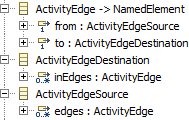 By using the “EOpposite” feature, you can have models instead of:
- Page A
  - Link Z to: Page B
- Page B
To be instead:
- Page A
  - Link Z to: Page B
- Page B in: Z
More information about this is available in the article on Ecore, specifically I want to be able to go backwards through a reference.
Set EOpposite properly in the Ecore model
 In the example above, you want the following model:
- Page
  - reference "in": 0..* of type Link
  - containment reference "links": 0..* of type Link, containment is true
- Link
  - reference "to": 1 of type Page
To set EOpposite properly, you want to change this to:
- Page
  - reference "in": 0..* of type Link, EOpposite is Link.to
  - containment reference "links": 0..* of type Link, containment is true, EOpposite is Link.from
- Link
  - reference "to": 1 of type Page, EOpposite is Page.in
  - reference "from": 1 of type Page, EOpposite is Page.links
- Regenerate the .genmodel from your changed .ecore file
- Regenerate the Model, Edit and Editor code
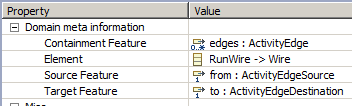
Set the Link Mapping properly in .gmfmap
- In Link Mapping, make sure Source Feature and Target Feature are properly set.
- Regenerate the .gmfmap file
- Regenerate the diagram code