Putting Generated GMF Diagram Editors into a New Category
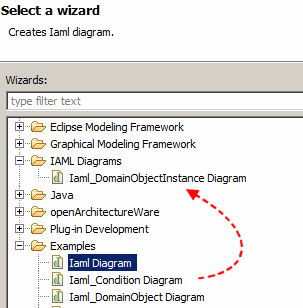 By default, when you generate diagram editors for a GMF application, the “Create New Diagram” option is tucked away in the “Examples” section (as to the right).
If you have the requirement to put it into a new section, first you need to define a separate New Wizards category, through the org.eclipse.ui.newWizards extension point, in another plugin.xml:
<extension point="org.eclipse.ui.newWizards">
  <category
    id="org.my.new.wizard.id"
    name="Category Title">
  </category>
</extension>
You can then take this category ID (org.my.new.wizard.id) and put it in Gen Editor Generator > Gen Diagram > (Editor) > Creation Wizard Category ID, which defaults to org.eclipse.ui.Examples.