Aligning Images in Tables in Latex
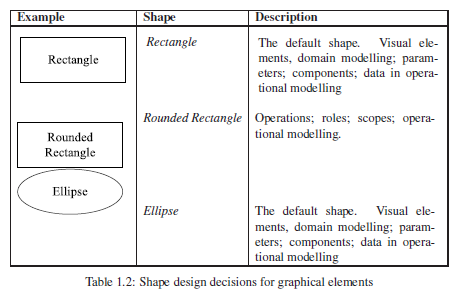 I had a problem where I was trying to layout inline images within a Latex table, as illustrated to the right. In the bottom row, you can see that the image is vertically aligned completely opposite to the wrapped text!
It seems the solution is to use the \imagetop command and then wrap everything in a minipage:
\def\imagetop#1{\vtop{\null\hbox{#1}}}
\begin{table}[tb]
\centering
\begin{tabular}{|l|l|p{60mm}|}
\hline
  \textbf{Example} & \textbf{Shape} & \textbf{Description} \\
\hline
  \imagetop{\includegraphics{images/shapes/rectangle.ps}}
  & \imagetop{
    \textit{Rectangle}
  } & \imagetop{
    \begin{minipage}[b]{60mm}
      The default shape. Visual elements, domain modelling; parameters; components; data in operational modelling
    \end{minipage}
  } \\

  \imagetop{\includegraphics{images/shapes/rounded-rectangle.ps}}
  & \textit{Rounded Rectangle}
  & Operations; roles; scopes; operational modelling. \\

  \includegraphics{images/shapes/ellipse.ps}
  & \textit{Ellipse}
  & The default shape. Visual elements, domain modelling; parameters; components; data in operational modelling \\
\hline
\end{tabular}
\caption{Shape design decisions for graphical elements}
\label{table:model-shapes}
\end{table}
This code will get you the table displayed above.
But if you look closely, there is some weird spacing problem going on - the minipages have additional spacing. Hooray!