Adding UML Guillemots in Latex
Within Text

\usepackage{aeguill}
\newcommand{\stereotype}[1]{
	\guillemotleft {#1}\guillemotright
}
You can now use \stereotype{class} to create «class».
Within Verbatim
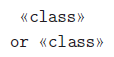 If you want to add a special symbol within the
 verbatim environment, things get a lot more interesting. First, you have to add a package to add the \text command in math mode:
% for \text in math mode
\usepackage{amstext}
Now, you need to tell verbatim to allow specific characters to be escaped:
\begin{verbatim}[commandchars=\\\{\}]
\stereotype{class}
or \text{\guillemotleft}class\text{\guillemotright}
\end{verbatim}
BUT, this also means that all other 's in your environment will now be LaTeX-enabled. Good luck working out how to turn that off ;)
Within Minted
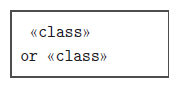 Minted is a fantastic package for adding colour formatting to source code listings. But it can’t handle special characters. Internally, it uses the same “commandchars” tag for
 verbatim as above; the problem is that Pygments automatically escapes all \s in the text.
My nasty solution is to define special escape characters for \, { and }:
\!!\becomes\\!!{becomes{\!!}becomes}
You can then patch your Pygments\formatters\latex.py with the following patch.
Finally, with a mode that is defined to mathescape=true, you can use the technique above to finally get special symbols:
\begin{xmlcode}
\!!\stereotype\!!{class\!!}
or \!!\text\!!{\!!\guillemotleft\!!}class\!!\text\!!{\!!\guillemotright\!!}
\end{xmlcode}
Note that this doesn’t work in all environments; for example, the Java environment automatically reformats the \s before LaTeX is given a chance to. The effort necessary to disable this might resemble something like this revision, which disabled Operators and redefined the meaning of Text.
From here, you could write a batch script to automatically insert these symbols in, or you could redefine the special escape phrases, etc.